Best AI Tattoo Cover Up Generators in 2026 (Compared, With a Real Test)
5 AI tools that design a cover-up from a photo of your old tattoo, compared on free credits and price. Plus our own test hiding a name tattoo. Checked October 30, 2026.
Disclosure: This page is written by the TattooGen AI team, and TattooGen AI is one of the tools below. Facts about other tools come from their own websites, checked on October 30, 2026. We only ran our own tool, so we make no claims about which one looks best. Tools are listed alphabetically.
Short answer: Five tools let you upload a photo of an old tattoo and preview a cover-up: InkD, RedoInk, Tat Ink, Tattoo Cover Up Generator and TattooGen AI. To start for free, RedoInk gives 8 credits after sign-in, and TattooGen AI gives 25 credits a month, enough for 3 runs of 2 images each. For one-time payment with no subscription, Tattoo Cover Up Generator starts at $6.99 for 6 generations.
How do they compare?
| Tool | Free to start | Paid | Notes from its website |
|---|---|---|---|
| InkD (inkd-app.com) | Not checked | Not checked | Mainly a marketplace to find and book tattoo artists; lists a Cover-Up Generator among its AI tools |
| RedoInk (redoink.com) | 8 free credits after sign-in; watermarked previews | Credit packs; Pro unlocks watermark-free downloads | Dedicated to previewing changes to old ink |
| Tat Ink (tat.ink) | Describes its cover-up tool as free online; site credits are 8 a month for guests, 25 signed in | From $8.79 a month | Full cover-up or rework of selected areas |
| Tattoo Cover Up Generator (tattoocoverupgenerator.com) | Upload and analysis before buying; generating needs a pack | $6.99 for 24 credits (6 generations), no auto-renewal | Each generation uses 4 credits |
| TattooGen AI (this site) | 25 credits a month with Google sign-in; watermarked | From $8.79 a month for 300 credits | Each run makes 2 images on your own photo and uses 8 credits |
Our test: hiding a name tattoo
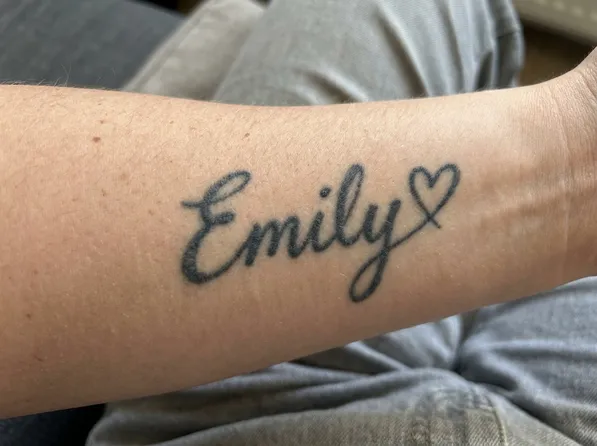
We ran one test on our own generator. The starting photo is a demo image we made with AI, showing a dark script name with a heart on a forearm. It is not a customer's photo.
| Input | 1 photo of a forearm with the name "Emily" |
| Idea box | Left empty, so the AI chose the subject |
| Style | Black & grey |
| Output | 2 cover-up images on the same photo |
| Time | About 1 minute |
| Credits used | 8 |
| Result | Both images hid the name under a dark floral design |
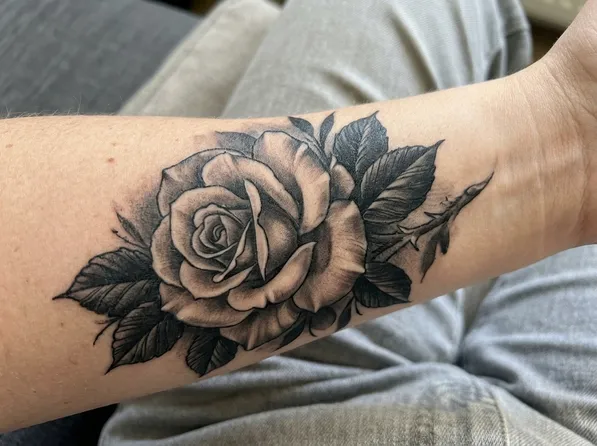
The image above comes from a separate run where we typed "a large rose with dark leaves".
One test proves little. An AI picture also isn't a promise that real ink will hide the old tattoo. Dense black lines often need a bigger design, and sometimes laser sessions first. Show the result to an artist who does cover-ups.
What makes a cover-up work
- Bigger than the old tattoo. Plan for 2 to 3 times the size for names and bands.
- Dark where the old lines are. Petals, fur, feathers and solid black hide old ink.
- Texture. Roses, peonies, animals, mandalas and Japanese pieces hide lines better than clean shapes.
- Avoid fine line. Thin lines can't hide what's underneath.
FAQ
Can AI really design a tattoo cover-up?
It can show ideas on your own photo, which helps you decide and explain what you want. A tattoo artist still has to judge whether real ink will cover the old design.
Is there a free tattoo cover up generator?
RedoInk gives 8 free credits after sign-in. TattooGen AI gives 25 free credits every month, and each run uses 8. Tat Ink describes its cover-up tool as free online. Free results may carry a watermark.
Which style is best for covering a tattoo?
Blackwork, black and grey, neo-traditional, Japanese and realism, because they use a lot of dark ink.
How do I hide a name tattoo?
Most people turn it into something dense such as a rose, a bird or a panther, about 2 to 3 times the size of the name. Try it with your own photo.